Edge AI Chips in 2027: How NPUs Are Changing Everyday Laptops
Three years ago, a laptop’s AI capability was a marketing line. In 2027, it is a piece of silicon with a name, a specification, and a number you can compare: the NPU, or neural processing unit. Every major laptop chip now ships with one. Qualcomm’s Snapdragon X2 Elite Extreme claims 80 TOPS, nearly double the 45 TOPS of the original Snapdragon X Elite. AMD’s Ryzen AI 9 HX 370 offers 50 TOPS. Intel’s Lunar Lake chips deliver 48 TOPS. Apple’s M4 Neural Engine provides 38 TOPS. Microsoft requires 40 or more TOPS for Copilot+ certification, and that threshold has become the dividing line of the laptop market.
But TOPS, trillions of operations per second, is a peak marketing number, not a measure of what your laptop actually does for you. The real story of edge AI chips in 2027 is subtler: longer battery life, instant on device transcription, background blur that costs nothing, and local AI models that run without sending your data to a cloud server. This article compares the four platforms honestly, explains what an NPU actually accelerates, and tells you which chip to buy, and when to wait.
The Four Platforms Compared
| Platform | NPU TOPS | Memory Bandwidth | Best For |
|---|---|---|---|
| Qualcomm Snapdragon X2 Elite Extreme | 80 | Not published | Highest NPU performance, battery life |
| AMD Ryzen AI 9 HX 370 (Strix Point) | 50 | 120 GB/s | Highest TOPS in the last generation |
| Intel Core Ultra 9 288V (Lunar Lake) | 48 | 136.5 GB/s | Widest software compatibility |
| Qualcomm Snapdragon X Elite | 45 | 135 GB/s | Battery life, silent running |
| Apple M4 | 38 | 120 GB/s | Efficiency, Apple Intelligence |
Share:
What an NPU Actually Does for You
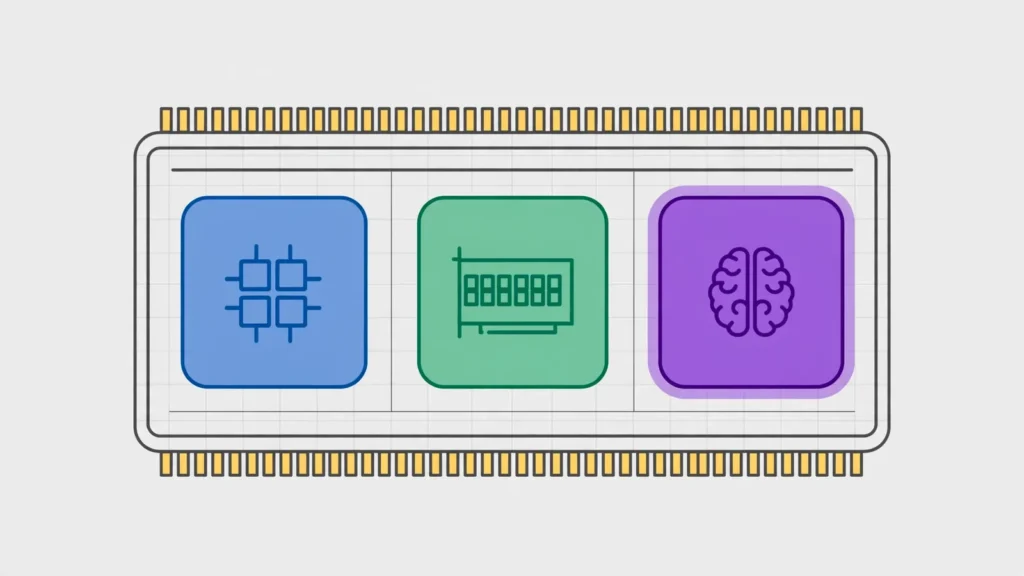
An NPU is a processor designed for one job: running neural network calculations at very low power. A CPU can do the same math, but it burns far more energy per calculation. A GPU can do it faster, but it drains the battery and spins up the fans. The NPU sits in the middle: fast enough for sustained AI workloads, efficient enough to run all day. Its power envelope is typically 4 to 11 watts at peak, against 45 watts or more for a laptop GPU under load.
In everyday use, the NPU handles the AI features that run continuously in the background. Windows Studio Effects, background blur, eye contact correction, and automatic framing in video calls, all run on the NPU. Live captions and real time transcription run on the NPU. Recall, Microsoft’s searchable screenshot memory on Copilot+ PCs, runs its on device models on the NPU. On a Mac, Apple Intelligence features like writing tools, notification summaries, and image cleanup run on the Neural Engine. The point is not that these features are impossible without an NPU. It is that without one, they cost battery life and responsiveness you can feel.
The honest caveat is that TOPS numbers overstate the difference between platforms. A 50 TOPS NPU is not meaningfully faster than a 48 TOPS NPU in real use, because most NPU workloads are small and the bottleneck is usually memory bandwidth or software optimization, not raw throughput. Laptop memory bandwidth ranges from 120 to 136 GB/s across these platforms, against 1,792 GB/s on a desktop GeForce RTX 5090, which is why no laptop NPU competes with a discrete GPU on heavy AI work. Buy the laptop, not the TOPS number.
The 2026 Generation: X2 Elite, Panther Lake, and Gorgon Point
All three Windows chip makers launched next generation platforms in 2026, which makes 2027 a genuinely good year to buy. Qualcomm’s Snapdragon X2 Elite, including the X2 Elite Extreme with 18 CPU cores and an 80 TOPS NPU, started arriving in laptops in the first half of 2026, with a redesigned Adreno GPU alongside the doubled neural performance. Intel launched Core Ultra Series 3, codenamed Panther Lake, at CES 2026, built on its new 18A manufacturing process with Arc Xe3 graphics, with laptops shipping globally from late January 2026. AMD launched the Ryzen AI 400 series, codenamed Gorgon Point, in the same quarter, adding higher clocks, more memory support, and an upgraded XDNA 2 NPU on top of the same Zen 5 foundation as Ryzen AI 300.
The practical consequence is that the previous generation, Intel Core Ultra 200V, AMD Ryzen AI 300, and the original Snapdragon X Elite, is now available at lower prices, and its software support is as settled as it gets. A Snapdragon X Elite laptop like the Lenovo Yoga Slim 7x, available from around 1,090 dollars, or an Intel machine like the HP OmniBook 7 Flip 16 at around 1,400 dollars, gives you full Copilot+ certification and mature drivers. The Acer Swift Go 14 AI, at 799 dollars with 48 TOPS, remains the best value entry point to the AI PC category.
Which platform should you choose? Pick Intel if your workflow depends on the broadest possible toolchain: OpenVINO, IPEX-LLM, DirectML, and the widest LM Studio and Ollama compatibility. Pick AMD if you want maximum throughput for diffusion models, video upscaling, and multi model pipelines, where its hybrid NPU plus integrated GPU execution wins. Pick Snapdragon if battery life, standby behavior, silence, and portability matter most, and you are comfortable with ARM, where most everyday apps now run natively but some niche x86 software still runs through emulation. Pick Apple if you live in the Mac ecosystem, where the M4’s Neural Engine and unified memory make Apple Intelligence feel effortless.
Local AI Models: What Actually Runs on the NPU

The most interesting question about laptop NPUs is whether they can run a large language model locally, and the honest answer in 2027 is: partly, and often not on the NPU at all. As of August 2026, mainstream local LLM stacks like llama.cpp, Ollama, and LM Studio execute on the integrated GPU or CPU, not the NPU, because the NPU path requires per model ONNX optimization that most open models have not received. Token generation on a laptop is bounded by memory bandwidth, and laptop SoCs offer 120 to 136 GB/s, which caps practical speeds at roughly 10 to 20 tokens per second for 7 to 8 billion parameter models.
That said, the NPU path is real where vendors have done the optimization work. Qualcomm’s AI Engine Direct lets the Hexagon NPU run 7 billion parameter models like Llama 3 at 15 to 20 tokens per second, with battery consumption dropping by up to 65 percent during local generation compared with CPU execution. A Snapdragon X Elite with 64 GB of unified memory runs 8 billion parameter models comfortably, Llama 3.1 8B needs about 5.8 GB in Q4 quantization, and can stretch to 14 billion parameter models in constrained setups. Intel’s Lunar Lake tops out at 32 GB of on package memory, which fits 8 billion parameter models but not 27 billion and above.
The practical advice is to think about model size, not TOPS. If you want to run a local chatbot, a transcription tool, or a coding assistant offline, 16 GB of RAM is the floor and 32 GB is comfortable. If you want to run larger models or multiple models at once, look for 64 GB configurations, which Snapdragon and AMD platforms support. And remember that the best local AI experience in 2027 often uses the whole chip: NPU for always on features, integrated GPU for the language model, and CPU for everything else. The NPU is one part of a heterogeneous system, not a replacement for the rest of it.
Battery Life: The Benefit You Feel Every Day
The most underrated effect of the NPU is battery life, and it is the benefit most laptop buyers actually notice. Offloading AI workloads from the CPU and GPU to a dedicated low power engine means video calls with background blur, live captions, and noise suppression no longer drain the battery the way they used to. The HP OmniBook Ultra 14, for example, is rated at up to 21 hours of battery life, and Snapdragon X Elite laptops routinely deliver real world all day use with AI features running.
This matters more than benchmark scores because it changes behavior. When transcription costs nothing in battery terms, people leave it on for every meeting. When background blur is free, every call looks professional. When Recall or its equivalent runs locally without a performance hit, people actually use it. The NPU’s real achievement is making AI features cheap enough to leave switched on, which is when they stop being demos and start being habits.
The battery story also explains why the NPU race is really an efficiency race. Qualcomm’s ARM based Snapdragon platform still leads on battery life and standby behavior, Intel’s Lunar Lake closed most of the gap with its on package memory design, and AMD’s Strix Point trades a little efficiency for higher peak performance. In 2027, any of the three gives you a full working day. The differences that remain are about software compatibility and price, not about whether the laptop lasts until dinner.
Should You Buy Now or Wait?

If you need a laptop now, buy now. The previous generation platforms are mature, well supported, and discounted, and none of that changes because a newer chip exists. A 48 TOPS Lunar Lake laptop or a 45 TOPS Snapdragon X Elite laptop runs every Copilot+ feature and every local AI workload that matters today. The 2026 generation brings real upgrades, Snapdragon X2 Elite’s 80 TOPS NPU, Panther Lake’s Arc Xe3 graphics and 18A process, Gorgon Point’s higher clocks, but usually costs more and has had less time in the market to shake out driver and app quirks.
Wait, or spend more, only if you specifically want the newest silicon, or if your workload is one of the few that genuinely benefits from 80 TOPS, such as running several AI models concurrently or doing on device video generation. For everyone else, the smart money in 2027 is on a discounted previous generation machine with 32 GB of memory, which will run local AI comfortably for years. The NPU is no longer the future of laptops. It is the present, and the present is already good enough.
Frequently Asked Questions
What is an NPU in a laptop?
An NPU, or neural processing unit, is a dedicated processor for running AI calculations at very low power. It handles background AI features like video call effects, live captions, and transcription without draining the battery the way a CPU or GPU would.
How many TOPS do I need in 2027?
Microsoft requires 40 or more TOPS for Copilot+ certification. In practice, 45 to 50 TOPS is the sweet spot for current laptops, and the difference between 48 and 50 TOPS is negligible in real use. Memory size matters more than TOPS for local AI models.
Can a laptop NPU run ChatGPT locally?
It can run open language models of similar size to small ChatGPT class models, typically 7 to 8 billion parameters, at 10 to 20 tokens per second. Most local LLM apps still run on the integrated GPU or CPU rather than the NPU, because NPU execution needs per model optimization.
Which is better: Snapdragon, Intel, or AMD for AI laptops?
Snapdragon leads on battery life and efficiency. Intel leads on software compatibility and toolchain breadth. AMD leads on raw NPU throughput and hybrid GPU execution for creative workloads. All three are good choices in 2027, and the best pick depends on your software, not the TOPS number.
Don’t Miss These, Explore More Topics